
Choosing an ergonomic office chair for back pain is less about finding a chair marketed as “orthopedic” and more about getting adjustability, support and movement right. A good chair can make a workstation easier to fit to your body, but it cannot by itself prevent or treat every cause of back pain.
This guide focuses on the features that matter when you spend long periods working at a desk: lumbar support, seat dimensions, armrests, backrest movement, adjustability and the way the chair fits into an active workstation.
Quick Answer: What Should You Look for?
For a desk chair used for several hours a day, prioritize adjustable lumbar support, adjustable seat height and depth, a supportive backrest, adjustable armrests and a backrest that allows comfortable movement. The chair should let you work with your feet supported, shoulders relaxed and the screen and keyboard positioned so you do not have to remain in an awkward posture.
There is no single chair design proven to eliminate back pain. Ergonomics is an interaction between the person, the chair, desk, screen, keyboard, mouse and working habits. Evidence on office-chair interventions is also mixed, which is why BioRestLab treats adjustability and fit as more important than marketing labels.
Our top picks
- Best overall Steelcase Series 1 — adjustable lumbar, seat depth and armrests from an established office-furniture maker. Check price
- Best mid-range SIHOO Doro C300 — self-adjusting lumbar support and 3D armrests at a mid-range price. Check price
- Best budget TRALT Mesh Office Chair — adjustable lumbar support in a breathable mesh chair; 4,900+ buyer ratings. Check price
Picks are chosen with our rating methodology from published research, verified-buyer feedback and manufacturer information, not hands-on testing. Affiliate links: as an Amazon Associate, BioRestLab earns from qualifying purchases.
1. Adjustable Lumbar Support
Lumbar support should contact the lower part of your back without forcing you into an exaggerated posture. A fixed cushion can work for one person and feel completely misplaced for another. If your current chair has no adjustable lumbar support, a separate lumbar cushion can be a low-cost first step (see which lumbar support pillow to get and how to fit it); see our guide to choosing a pillow or cushion for lower back pain.
Where possible, look for adjustment in at least height and depth. The goal is not to push the lower back forward as much as possible; it is to provide comfortable support while allowing a natural working position.
A 2017 study comparing office-chair configurations found that lumbar support and seat-pan tilt influenced measured spinal posture. The result is useful when choosing a chair, but improved posture should not be interpreted as proof that a chair will eliminate pain for every user.
2. Seat Height: Your Feet Should Be Supported
Set the chair so your feet can rest securely on the floor or on an appropriate footrest. Your knees should not be forced upward by a seat that is too low, nor should your feet dangle because the chair is too high.
The correct height also depends on the desk. If the desk is fixed and high, lowering the chair until your feet are comfortable may leave your elbows too low. In that situation, a footrest can be more useful than compromising the entire workstation.
3. Seat Depth Matters More Than Many Buyers Realize
When sitting back against the backrest, the front edge of the seat should not press into the back of your knees. You also need enough depth to support your thighs without forcing you to slide forward.
Adjustable seat depth is particularly useful because people with different leg lengths can need very different settings even when their overall height is similar.
4. Armrests: Support the Arms Without Raising the Shoulders
Armrests are useful when they support the forearms without pushing the shoulders upward or forcing the elbows away from the body. Adjustable armrests give you more options to match the desk and keyboard position.
Do not choose a chair simply because it has “4D armrests.” The important question is whether the available adjustments allow your arms to rest comfortably while your shoulders remain relaxed.
5. Backrest Height and Recline
A backrest should provide comfortable support over the part of the body it is designed to support. A chair that allows controlled reclining can also help you change position instead of remaining rigidly upright throughout the day.
Recline tension should be adjustable enough that the backrest moves with you without requiring excessive effort. A locking mechanism can be useful for some tasks, but working in one fixed position for hours is not the objective of an ergonomic setup.
6. Mesh, Foam or Upholstery?
| Material | Potential advantage | What to check |
|---|---|---|
| Mesh | Airflow and a relatively firm, responsive feel | Tension, frame edges and long-term durability |
| Foam | Pressure distribution and cushioning | Foam density, compression over time and heat retention |
| Fabric upholstery | Familiar feel and potentially good cushioning | Heat, cleaning and foam quality underneath |
| Leather/synthetic leather | Easy cleaning and a structured feel | Heat retention, surface durability and breathability |
Material is secondary to fit. A premium material does not compensate for a seat that is too deep or lumbar support that cannot be positioned correctly.
7. The Chair Is Only One Part of the Workstation
A chair can be adjusted perfectly and still leave you in a poor working position if the desk or monitor is incorrectly placed.
- Monitor: position it so you do not need to maintain a prolonged neck bend to read the screen.
- Keyboard and mouse: keep them close enough that you do not have to reach forward continuously.
- Desk: the height should allow the chair and arm position to work together rather than forcing your shoulders up.
- Feet: keep them supported rather than sitting on the edge of the seat.
- Movement: change position regularly instead of treating one “perfect” posture as a position that must be maintained all day.
Does an Ergonomic Chair Actually Reduce Back Pain?
The evidence does not justify promising that an ergonomic chair will cure back pain. Studies of ergonomic interventions vary substantially in design, chair characteristics and outcomes.
There is nevertheless a practical reason to prioritize adjustability: a chair that can be fitted to the user gives more opportunity to reduce obvious workstation mismatches. The evidence supports an ergonomic approach rather than a particular brand, material or “orthopedic” label.
Movement May Matter as Much as the Chair
Long periods of uninterrupted sitting are a separate issue from whether the chair is comfortable. Even a well-designed chair cannot make prolonged static sitting equivalent to normal movement.
Where work allows it, alternate between sitting and standing, take short movement breaks and vary your position throughout the day. The exact frequency should fit your work and symptoms; there is no scientifically established universal “perfect” interval.
Features Worth Paying For
| Feature | Priority | Why |
|---|---|---|
| Seat-height adjustment | Essential | Allows the chair to work with your body and desk |
| Adjustable lumbar support | High | Allows the lower-back support to be positioned to the individual |
| Seat-depth adjustment | High | Important for accommodating different leg lengths |
| Adjustable armrests | High | Helps support the arms without elevating the shoulders |
| Reclining backrest | Useful | Allows changes in working position |
| Headrest | Optional | Preference-dependent; not essential for every desk task |
| Footrest compatibility | Useful | Can help when desk height prevents optimal chair adjustment |
Features That Are Often Over-Marketed
- “Orthopedic” or “medical” labels without supporting evidence.
- Very large headrests presented as a treatment for neck or back pain.
- Expensive materials that do not improve adjustability or fit.
- Numerous adjustment directions that cannot actually be used to achieve a comfortable position.
- Claims that a chair will permanently correct posture or cure chronic pain.
A 60-Second Chair Fit Check
- Sit fully back against the backrest.
- Set the seat height so your feet are supported.
- Adjust seat depth so the front edge does not press behind your knees.
- Position lumbar support where it feels supportive rather than forceful.
- Set armrests so your shoulders remain relaxed.
- Place keyboard and mouse close enough to avoid prolonged reaching.
- Check the monitor position and make sure you can work without sustained neck flexion.
- After several minutes, change position and check whether the chair allows movement comfortably.
How BioRestLab Evaluates Ergonomic Chairs
BioRestLab evaluates products using evidence base, build quality and durability, comfort and usability, value for money, safety and certifications, and brand trust and warranty. We analyze published research, manufacturer specifications and available verified-purchase feedback.
We do not claim hands-on testing unless a product has actually been physically tested by BioRestLab. For more detail, see our Rating Methodology.
How we picked these chairs: we matched the criteria in this guide (adjustable lumbar support, seat depth, armrests that do not raise the shoulders, recline) against current listings, manufacturer specifications and patterns in verified-buyer feedback. We have not tested these chairs hands-on. Use the 60-second fit check above when your chair arrives.
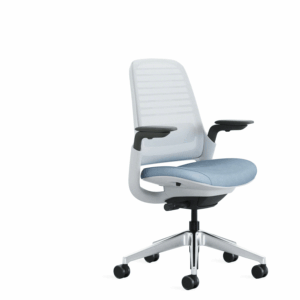
Best overall
Steelcase Series 1
Best for: long working days where you need to fine-tune lumbar height, seat depth and armrests.
- Adjustable lumbar, seat depth and armrests from an established office-furniture maker
- The highest price of the three; check the listing for the caster type that suits your floor
Best mid-range
SIHOO Doro C300
Best for: people who want lumbar support that follows their movement without manual adjustment.
- Self-adjusting lumbar support and 3D armrests at a mid-range price
- Self-adjusting lumbar suits some backs better than others; check the return window in case the fit is wrong
Best budget
TRALT Mesh Office Chair
Best for: a home office on a tight budget where adjustable lumbar support is the priority.
- Adjustable lumbar support in a breathable mesh chair
- 4,900+ buyer ratings
- Check on the listing whether seat depth adjusts; if your thighs are long or short, seat depth matters as much as the lumbar
Affiliate links: BioRestLab may earn a commission from qualifying purchases made through some links on this page, including as an Amazon Associate, at no extra cost to you.
When a Chair Is Not the Answer
Persistent or worsening pain should not automatically be attributed to your chair. Seek appropriate medical assessment when pain is severe, follows significant trauma, is accompanied by progressive weakness or numbness, or persists despite reasonable changes to your activity and workstation.
For nighttime recovery, see our evidence-based mattress guide and our guide to sleeping positions for lower back pain.
Related BioRestLab Guides
- Best Mattress for Back Pain: Evidence-Based Buying Guide
- Best Sleeping Position for Lower Back Pain: What the Evidence Shows
- How Sleep Affects Muscle Recovery: The Science
- TENS Unit for Lower Back Pain: What to Know Before You Buy
- Posture & Ergonomics: The Complete Workstation Guide
This article is for general educational purposes and is not a substitute for professional medical advice.
Source: De Carvalho et al., Ergonomics (2017), study of office-chair configurations, lumbar support and seat-pan tilt; plus published occupational ergonomics literature reviewed by BioRestLab.